TENS — Tom's Event Notification Service
April 8, 2026
TENS is an Android application for managing contact groups and sending SMS notifications to those groups. It is useful for recurring events where you need to notify the same set of people with slightly different details each time.
Download
Home Screen
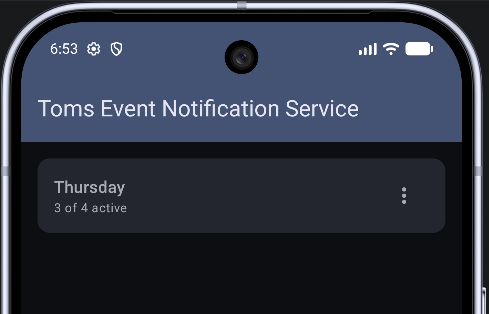
The main landing page for TENS displays all of your contact groups. From here you can:
- Create a new group — tap the button to set up a fresh group with a name and its own contact list.
- Copy a group — duplicates an existing group, including all of its contacts, so you can quickly spin up a similar group without re-entering everyone.
- Select a group — tap a group to open it and navigate to the contact editor or message sender.
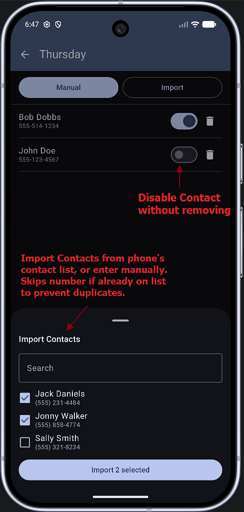
The contact editor lets you build the recipient list for a group. Each group maintains its own independent list of contacts.
- Import from phone contacts — pick directly from your device's address book to add people quickly, duplicate numbers will be ignored.
- Enter numbers manually — type a phone number directly for contacts not in your address book.
- Disable a contact — use the toggle to temporarily exclude a contact from messages without removing them from the list, so they can be re-enabled later.
Send Message
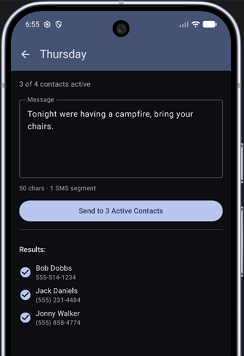
The message page is where you compose and send an SMS to all active contacts in the group.
- Compose your message — type the text you want to send in the message field.
- Send to active contacts — only contacts that have not been disabled in the contact editor will receive the message.
- Message is retained — after sending, the message text stays in the field so you can make small edits (like updating a date or time) and send again without retyping the whole thing.
Release Notes
- 1.0.1 — Increase delay between SMS message sends to 5 seconds.
- 1.0.2 — Changed send routine to dynamically update sending status and wait for previous message to send before sending the next message. Leaves 3 second delay to avoid going over 20 messages per minute (some carriers send a spam warning).